Seed, paste or CSV
Begin with a seed alone, paste one phrase per line with optional integer metrics, or import one CSV whose keyword and metric columns are recognized flexibly.

Move from an unstructured keyword list to a topic map you can inspect, reproduce and export.
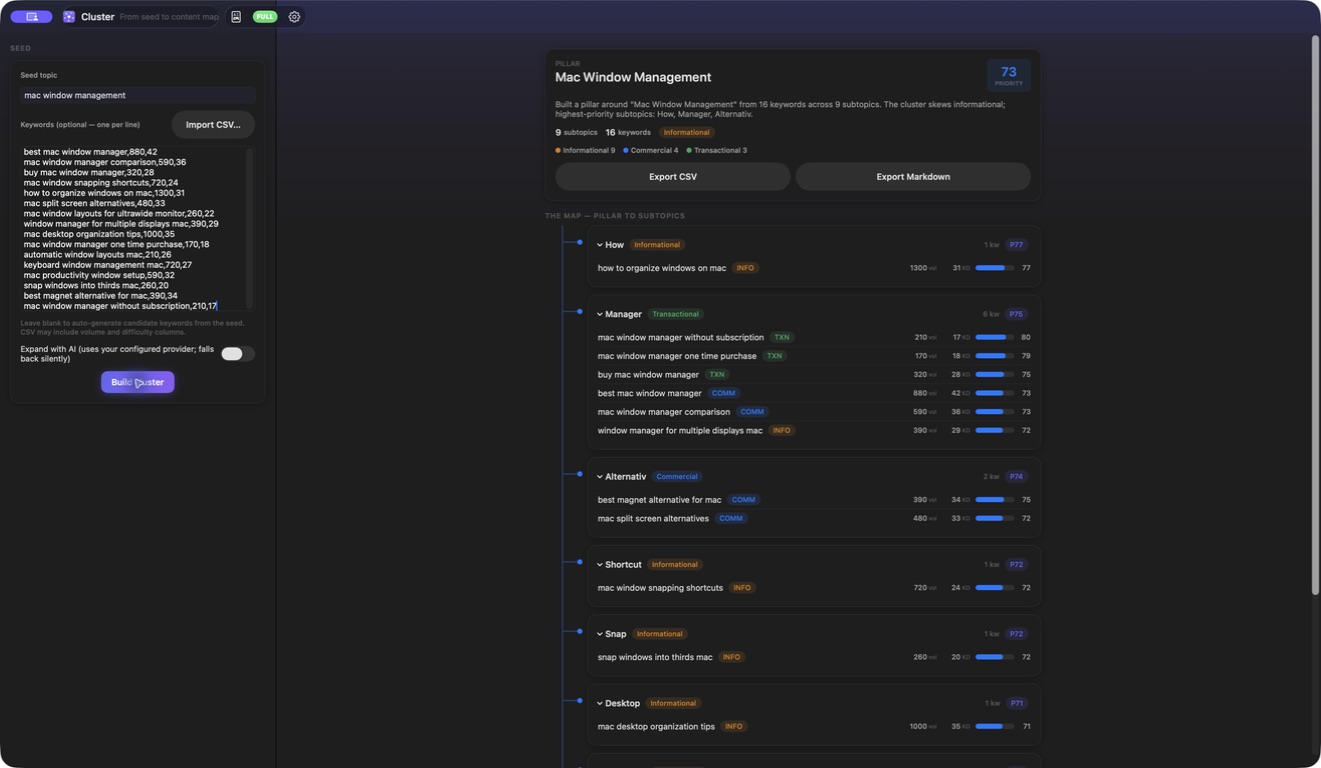
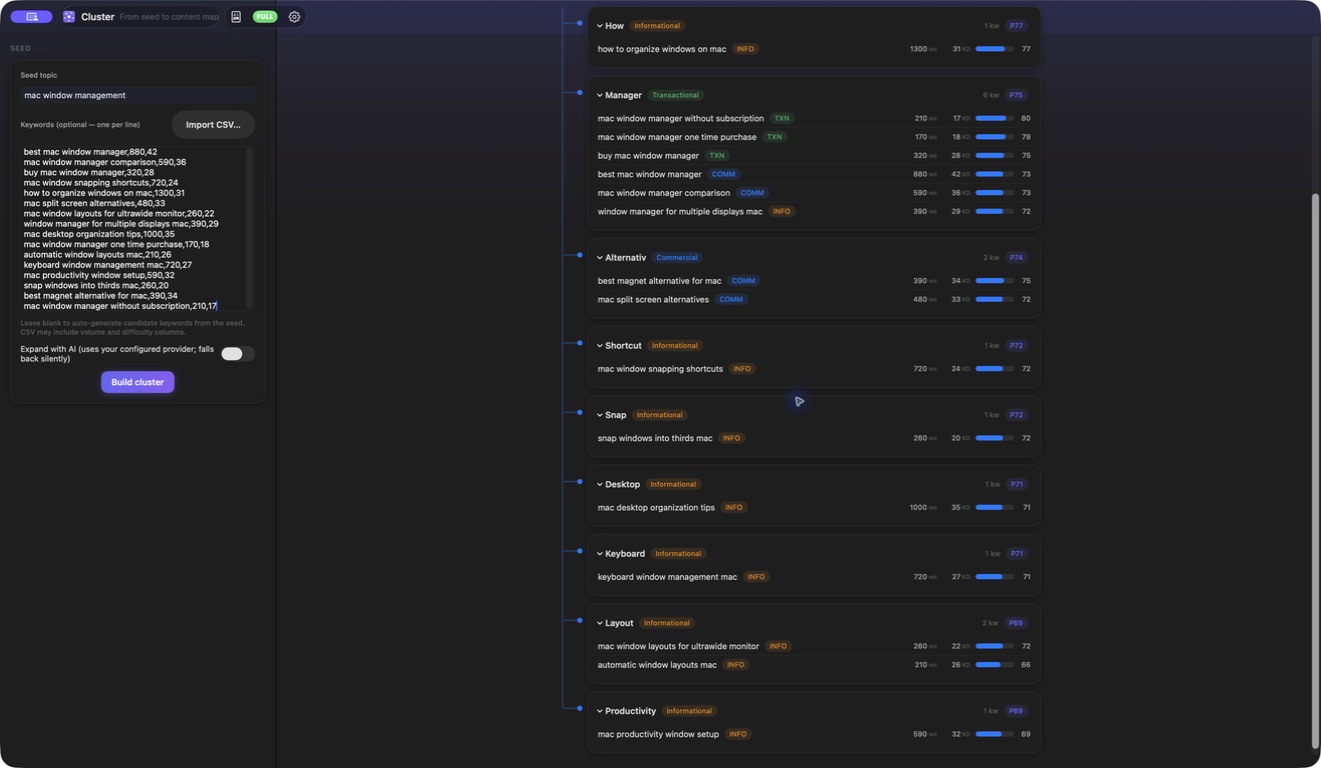
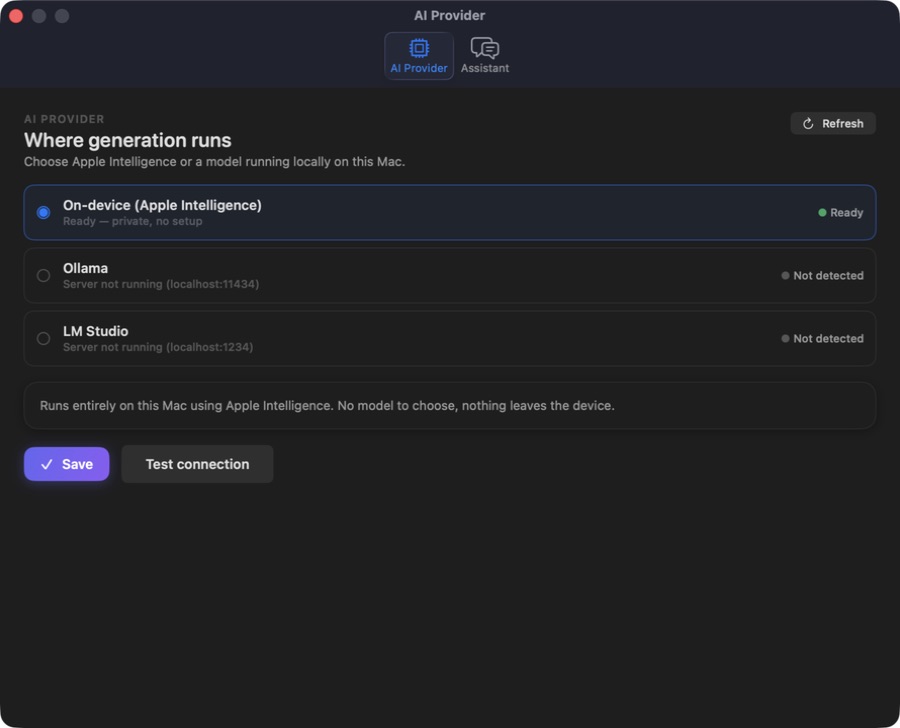
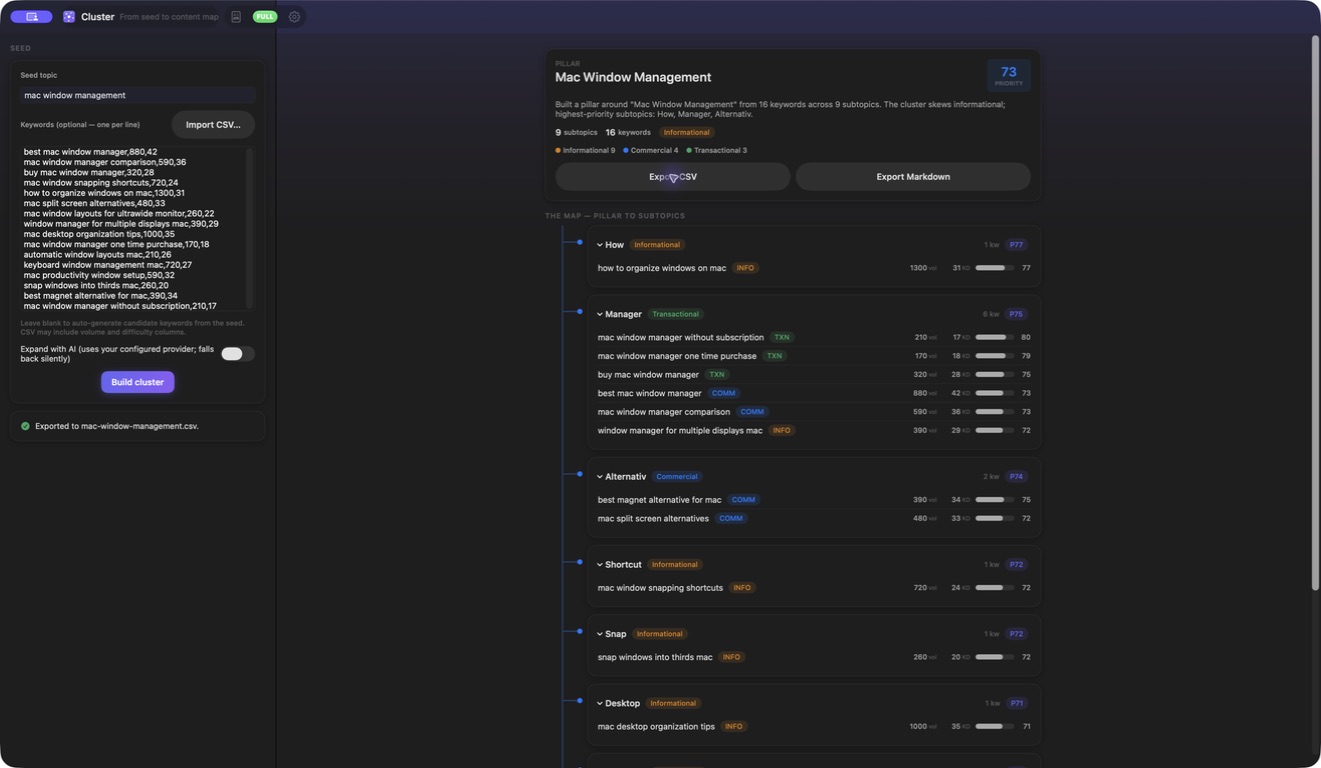
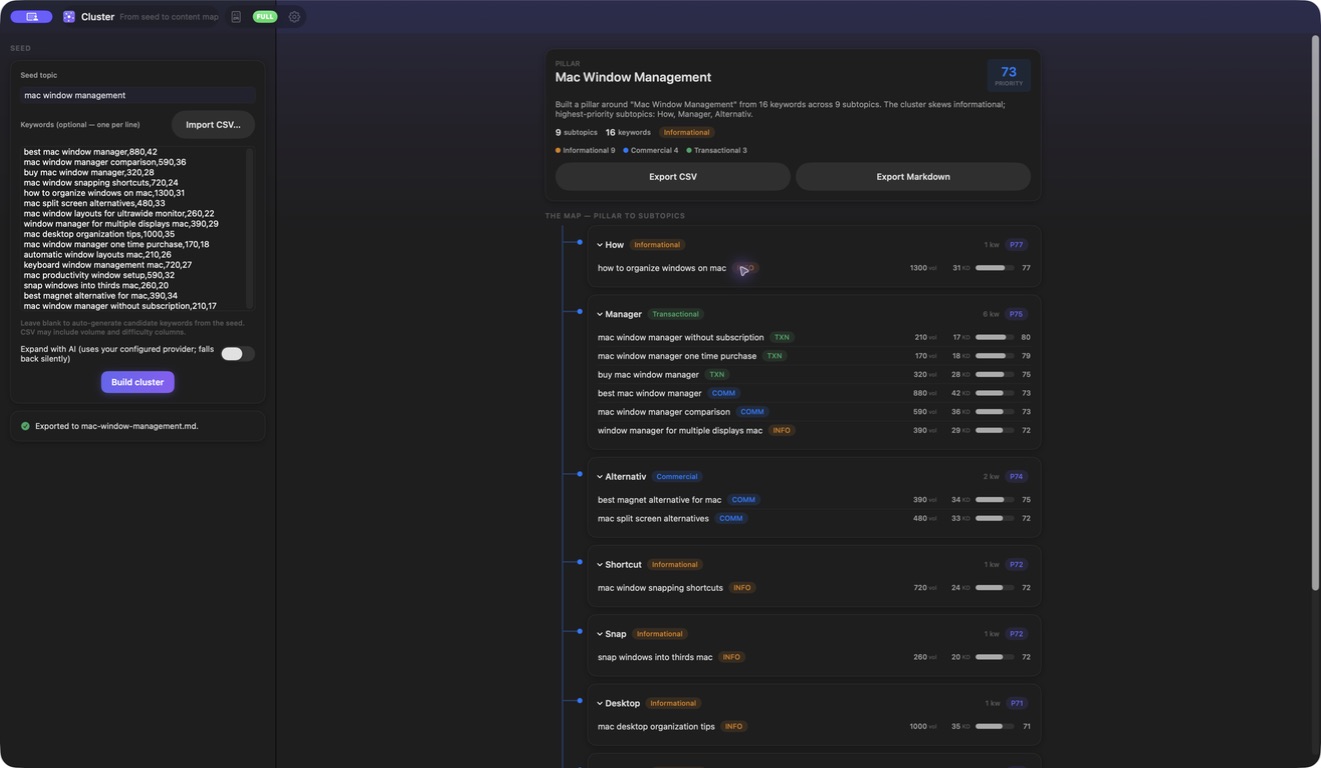
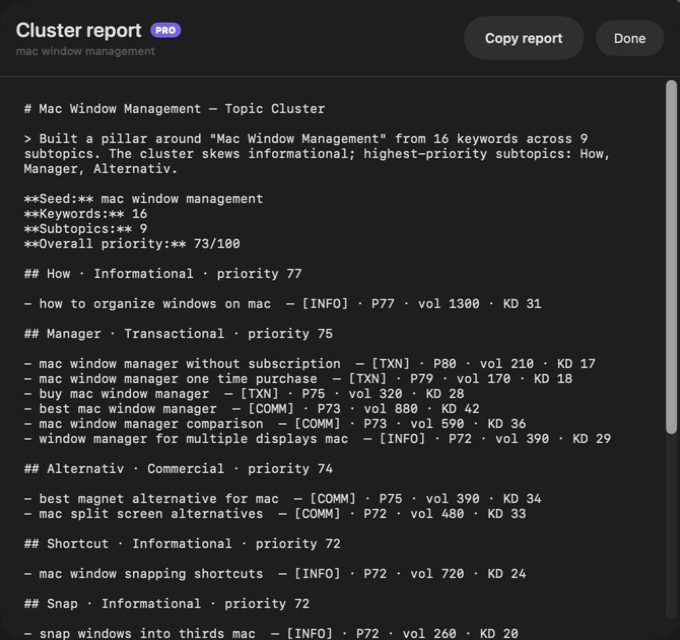
A silent screen tour of the shipping Cluster app: Supplied volume difficulty priority plan; Expanded pillar subtopic keyword tree; Optional local AI provider settings; Csv export completed; Markdown export completed; Full cluster report preview.
This website download is a separate direct-distribution build from the Mac App Store edition. It contains no StoreKit purchase flow or subscription screen: every feature is available after the one-time website purchase.
Apple notarized this exact disk image after an automated malware check. It is signed with the publisher's Developer ID and its notarization ticket is stapled to the download, so Gatekeeper can verify it even when your Mac is offline.
How signing, notarization and installation workd919f7f5dd2d2d064fcf00311dc8a4f9f579ceba39743457e6473216755b2e9eA private SEO topic-map planner for Mac that turns a seed and supplied keywords into deterministic pillars, subtopics, heuristic intent and reproducible priorities, with CSV input and CSV or Markdown export.
Cluster begins with material you control: a seed topic, an optional pasted keyword list or an imported CSV. A seed on its own expands through a disclosed deterministic set of candidate modifiers. Pasted rows can be one phrase per line or carry trailing integer volume and difficulty values. CSV import recognizes keyword, keywords, query, term or phrase columns case-insensitively, plus common volume and difficulty headings, and otherwise uses the first column as the phrase.
The same input produces the same plan. Cluster trims blank rows, deduplicates phrases case-insensitively, sorts them into a stable processing order and groups them beneath a pillar and expandable subtopic tree. Every keyword receives a heuristic search-intent label and a 0–100 priority score derived from intent, optional user-supplied volume and difficulty, and long-tail specificity. The interface shows intent mix, subtopic priority and any imported metrics so the recommendation can be challenged rather than accepted as hidden truth.
Optional AI expansion asks a configured provider for up to 12 additional long-tail phrases that cover gaps across informational, commercial and transactional intent. Apple Intelligence on supported Macs, a local Ollama or LM Studio server, or a bring-your-own cloud provider can supply those ideas. Returned phrases are cleaned and deduplicated before Cluster rebuilds the map through the same deterministic engine; an unavailable provider, error or empty response leaves the original plan intact.
Export the result as a flat CSV containing subtopic, keyword, intent, volume, difficulty and priority, or as a readable Markdown content plan with the pillar summary and complete hierarchy. The core workflow runs offline with no account, analytics or telemetry. The separate website Direct edition is Developer ID-signed and Apple-notarized, permanently enables Pro and the full report after one purchase, and contains no StoreKit subscription or paywall code.
Begin with a seed alone, paste one phrase per line with optional integer metrics, or import one CSV whose keyword and metric columns are recognized flexibly.
Create a reproducible pillar, subtopics and ordered keyword rows with case-insensitive deduplication and stable tie-breaking.
Inspect heuristic intent, intent mix and 0–100 priorities derived from disclosed signals rather than an opaque recommendation.
Carry user-supplied integer search volume and difficulty through the map and into both export formats without treating them as live database values.
Ask a configured Apple, local or cloud model for up to 12 gap-filling phrases; provider failure preserves the deterministic plan.
Export a flat analysis-ready CSV or a human-readable Markdown plan containing the complete pillar-and-subtopic map.
Cluster is a planning heuristic, not a live keyword-research database, SERP analyzer, crawler, rank tracker, publishing system or guarantee of traffic, rankings, conversions or topical authority. It processes at most 1,000 distinct keywords per build after case-insensitive deduplication and stable alphabetical ordering. Intent classification and 0–100 priorities are reproducible estimates based on phrase signals and optional metrics you supplied; they are not measured market truth, current search demand, ranking probability or validation that a topic belongs in a strategy. CSV import reads one local text file and does not authenticate with an SEO provider or refresh metrics. The current app has no saved-project library, version history, collaboration, monitoring or publishing integration, so CSV or Markdown export is the durable handoff. Optional AI ideas can be generic, irrelevant or inaccurate and require human SEO, audience, brand and editorial review. Apple Intelligence and local providers depend on system availability; selecting a cloud provider sends the relevant seed and existing keyword context directly to that provider under its terms. API keys are stored in the macOS Keychain.
 JobomateFinds roles, drafts tailored applications, and sends nothing until you approve it — from your own email account.
 Cadence Email SequencesPlan complete email journeys on a visual timeline with waits, branch conditions, local validation, drafting and clean exports.
 Vantage Competitor IntelCompare collected competitor messaging, uncover positioning gaps, build battlecards and copy a complete private briefing.
Website edition purchased once and permanently unlocks Pro with no StoreKit or paywall; the separate App Store edition retains its subscription purchase flow.
Buy & downloadA private topic-map planner for Mac. Turn a seed plus pasted keywords or CSV rows into a deterministic pillar-and-subtopic tree, inspect heuristic intent and 0-100 priorities, and export the complete plan as flat CSV or Markdown.
Cluster is for SEO strategists, content marketers, editors and founders organizing supplied keyword research into a reviewable topic-cluster plan. Organize supplied keyword research into a deterministic pillar-and-subtopic map, review intent and priorities, then export a durable content plan.
Cluster requires macOS 14 or later. Supported architecture: Apple silicon and Intel. Check About This Mac before purchasing.
No. Cluster has no keyword database, SERP feed or provider account connection. Volume and difficulty appear only when you supply integer values in pasted rows or an imported CSV; otherwise the deterministic score uses disclosed neutral defaults.
It recognizes keyword, keywords, query, term or phrase case-insensitively, along with common volume and difficulty headings. If no known phrase heading exists, it uses the first column. Volume and difficulty must parse as integers; decimals and abbreviated values such as 1.2K are not silently converted.
It is a deterministic 0–100 heuristic combining classified search intent, log-scaled user-supplied volume, inverse user-supplied difficulty and query-token specificity. Missing metrics receive neutral defaults. The result helps sort a plan but is not measured demand, ranking probability or an outcome forecast.
No. Parsing, deduplication, intent classification, scoring, grouping and exports all work deterministically without a model, account or key. Optional expansion can use Apple Intelligence, Ollama, LM Studio or a supported cloud provider.
Cluster keeps the deterministic map. Provider output is used only when it contains usable new phrases; returned ideas are sanitized and deduplicated before the deterministic plan is rebuilt.
No. The current app has no saved-project library or cloud sync. Export CSV or Markdown for a durable handoff before replacing the current plan or quitting.
Yes. The separate Cluster Direct build permanently enables Pro, unlimited input within the 1,000-distinct-keyword processing cap and the complete reporting workflow. It is a one-time website purchase with no subscription, account, StoreKit or paywall.
No. The Mac App Store edition can include Apple's in-app purchase system. The website Direct edition is a separately signed build with no StoreKit purchase flow: one website purchase unlocks the complete app with no recurring charge.
The download is the complete app. There is no subscription, no locked tier, no account, and no trial timer — every feature is included.
Choose $10 for one app, $20 for two different apps, or $49 for every published app through Stripe's hosted checkout on this page. Download links are delivered on the confirmation page and by email. Each link is single-use; its exact expiry is shown in your delivery email. Keep the installer. If the link expires or a download fails, contact support@macossoftware.com with your receipt instead of buying again.
Yes. Version 1.0 is signed with a Developer ID certificate, notarized by Apple, and distributed with a stapled notarization ticket. Its published SHA-256 checksum is d919f7f5dd2d2d064fcf00311dc8a4f9f579ceba39743457e6473216755b2e9e.
Cluster video tour: topic trees and keyword-plan exports. Watch the video and read a list of the views it shows before choosing the app.